MySQL Basic Information
MySQL is an open-source relational database management system (RDBMS) that uses Structured Query Language (SQL) for managing and manipulating data. It is widely used for web applications, data warehousing, and various other applications due to its reliability, performance, and ease of use.
MySQL Architecture
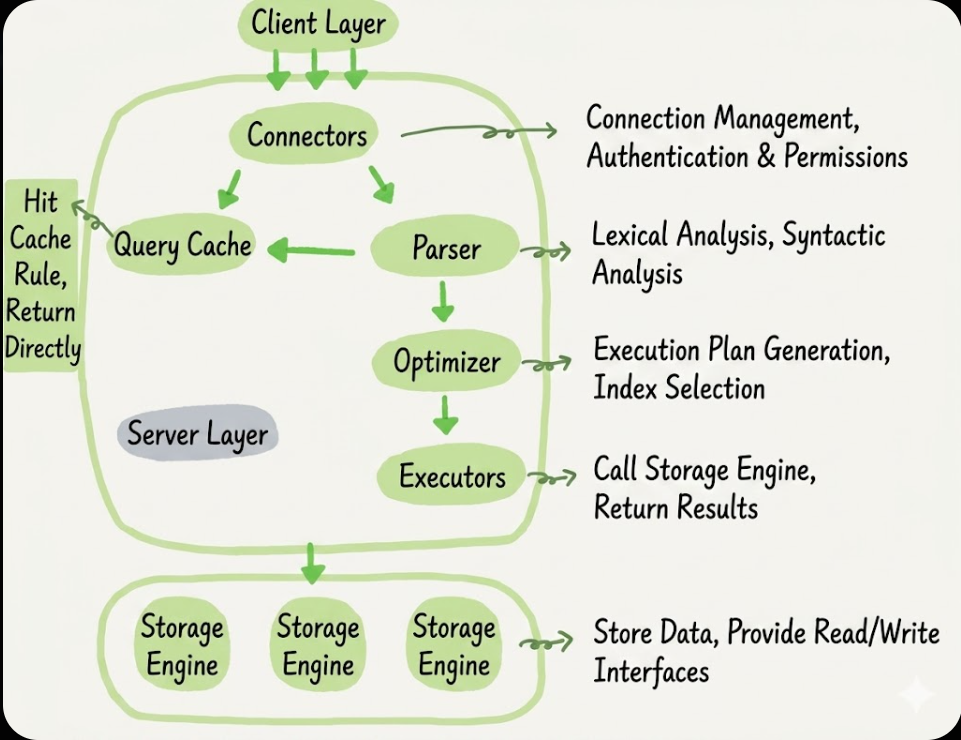
MySQL follows a client-server architecture, where the MySQL server manages the database and handles client requests. The server consists of several components, including:
- Client Interface: Handles communication between the client and the server, processing SQL queries and returning results.
- Connector: Manages client connections and authentication.
- Query Cache: Caches the results of SELECT statements to improve performance for repeated queries.
- SQL Parser: Parses SQL queries and checks for syntax errors.
- Preprocessor: Prepares the query for execution by optimizing it and determining the best execution plan.
- Optimizer: Determines the most efficient way to execute a query.
- Executor: Executes the query and retrieves data from the storage engine.
- Storage Engine: Responsible for storing and retrieving data from the disk. MySQL supports multiple storage engines, such as InnoDB and MyISAM, each with its own features and performance characteristics.
Server Layers
The Server layer includes connectors, query cache, analyzer, optimizer, executor, etc, covering most of MySQL’s core service functions, as well as all built-in functions (such as date, time, mathematical and encryptoin functions, etc). All core-storage engine functions are implemented in this layer, such as stored procedures, triggers, views, etc.
Import and Export
Importing and exporting data in MySQL can be done using various methods, including command-line tools, graphical interfaces, and SQL commands. Here are some common ways to import and export data:
Importing Data
- Using the
mysqlcommand-line tool:1
mysql -u username -p database_name < file.sql
- Using the
sourcecommand within the MySQL shell:1
SOURCE /path/to/file.sql;
Exporting Data
- Using the
mysqldumpcommand-line tool:1
mysqldump -u username -p database_name > file.sql
Data Types
MySQL supports various data types that can be categorized into several groups: - Numeric Data Types:
INT,FLOAT,DOUBLE,DECIMAL, etc. - String Data Types:
VARCHAR,CHAR,TEXT,BLOB, etc. - Date and Time Data Types:
DATE,DATETIME,TIMESTAMP,TIME, etc. - Spatial Data Types:
GEOMETRY,POINT,LINESTRING,POLYGON, etc. - JSON Data Type:
JSONfor storing JSON formatted data.
Database
A database is an organized collection of data that can be easily accessed, managed, and updated. It allows users to store and retrieve information efficiently. MySQL is a popular choice for managing databases due to its robustness and scalability.
1 | -- view all databases |
Table
A table is a collection of related data organized in rows and columns within a database. Each table has a unique name and consists of fields (columns) that define the structure of the data, and records (rows) that contain the actual data.
1 | -- create a new table |
SQL
SQL (Structured Query Language) is a standard programming language used for managing and manipulating relational databases. It allows users to perform various operations such as querying data, updating records, and managing database structures.
SQL Types
- Data Query Language (DQL): Used for querying data from the database (e.g.,
SELECT). - Data Manipulation Language (DML): Used for inserting, updating, and deleting data (e.g.,
INSERT,UPDATE,DELETE). - Data Definition Language (DDL): Used for defining and modifying database structures (e.g.,
CREATE,ALTER,DROP). - Data Control Language (DCL): Used for controlling access to the database (e.g.,
GRANT,REVOKE). - Transaction Control Language (TCL): Used for managing transactions (e.g.,
COMMIT,ROLLBACK).
DDL Example
1 | -- create a new database |
DML Example
1 | -- insert data into the table |
DQL Example
1 | -- query data from the table |
DCL Example
1 | -- grant privileges to a user |
Constraints
Constraints are rules applied to columns in a table to enforce data integrity and consistency. They ensure that the data entered into the database meets certain criteria and prevents invalid data from being stored.
- Entity Integrity Constraints: Ensure that each row in a table has a unique identifier (e.g.,
PRIMARY KEY,UNIQUE). - Referential Integrity Constraints: Ensure that relationships between tables are maintained (e.g.,
FOREIGN KEY). - Domain Integrity Constraints: Ensure that the data in a column falls within a specific range or set of values (e.g.,
CHECK,NOT NULL). - User-Defined Integrity Constraints: Custom rules defined by the user to enforce specific business logic.
1 | -- create a table with constraints |
Primary Key Constraints
The PRIMARY KEY constraint uniquely identifies each record in a table. It must contain unique values and cannot contain NULL values. A table can have only one PRIMARY KEY, which can consist of one or multiple columns.
1 | CREATE TABLE users ( |
Unique Constraints
The UNIQUE constraint ensures that all values in a column are distinct. It allows NULL values, but only one NULL value is allowed in a column with a UNIQUE constraint.
1 | CREATE TABLE users ( |
Foreign Key Constraints
The FOREIGN KEY constraint is used to link two tables together. It ensures that the value in a column (or a set of columns) in one table matches the value in a column (or a set of columns) in another table. This helps maintain referential integrity between the tables.
1 | CREATE TABLE orders ( |
Foreign Key Actions
Foreign key constraints can also be defined with actions such as ON DELETE and ON UPDATE to specify what happens when the referenced record is deleted or updated.
1 | CREATE TABLE orders ( |
- Cascade: Automatically deletes or updates the related records in the child table when the referenced record in the parent table is deleted or updated.
- Set Null: Sets the foreign key column to NULL when the referenced record is deleted or updated
- No Action: Prevents the deletion or update of the referenced record if there are related records in the child table.
- Restrict: Similar to No Action, but it checks the constraint immediately rather than at the end of the statement.
1 | CREATE TABLE orders ( |
Not Null Constraints
The NOT NULL constraint ensures that a column cannot have NULL values. This means that every record must have a value for that column.
1 | CREATE TABLE users ( |
AUTO_INCREMENT Constraints
The AUTO_INCREMENT constraint is used to generate a unique identifier for new rows in a table. It automatically increments the value of the specified column for each new record inserted into the table.
1 | CREATE TABLE users ( |
Default Constraints
The DEFAULT constraint is used to provide a default value for a column when no value is specified during the insertion of a new record. If no value is provided for the column, the default value will be used.
1 | CREATE TABLE users ( |
Check Constraints
The CHECK constraint is used to limit the values that can be placed in a column. It ensures that the value in a column meets a specific condition.
1 | CREATE TABLE employees ( |
Multi-Table Queries
Multi-table queries are used to combine data from multiple tables. They allow you to perform complex queries that involve multiple tables and joins. MySQL mainly uses Nested-Loop Join, Hash Join and Merge Join to execute multi-table queries.
1 | SELECT * FROM table1 JOIN table2 ON table1.id = table2.id; |
Process:
- Logical Joins: The optimizer creates a logical relationship between the tables based on the join conditions specified in the query.
- The Optimizer’s Choice: The optimizer evaluates different join strategies (Nested-Loop Join, Hash Join, Merge Join) and selects the most efficient one based on factors such as table size, indexes, and join conditions.
- Driving Table Selection: The optimizer determines which table to use as the driving table (the one that is read first) based on the estimated number of rows and the presence of indexes. Usually, the smaller table is chosen as the driving table to minimize the number of iterations.
- Join Order: The optimizer determines the order in which tables are joined based on the join conditions and the estimated number of rows in each table. The optimizer considers the cardinality of the join conditions and the selectivity of the indexes to determine the best join order.
- Index Utilization: The optimizer checks for the presence of indexes on the join columns and evaluates their selectivity. If an index is available and has good selectivity, it may choose to use it to speed up the join operation.
- Nested-Loop Join: The optimizer generates a nested loop join plan for the query. It considers the cardinality of the join conditions and the selectivity of the indexes to determine the best join order.
| Stage | Description | |
|---|---|---|
| FROM/JOIN | The optimizer identifies the tables involved in the query and the join conditions. It evaluates the join conditions to determine how the tables are related and how they can be joined efficiently. | |
| ON/USING | The optimizer evaluates the join conditions and determines the best join order based on factors such as cardinality, selectivity, and index utilization. | |
| WHERE | The optimizer evaluates the WHERE clause to determine the best execution plan based on factors such as selectivity, index utilization, and join order. | |
| GROUP BY | The optimizer evaluates the GROUP BY clause to determine the best execution plan based on factors such as selectivity, index utilization, and join order. | |
| AGGREGATE | The optimizer evaluates the aggregate functions to determine the best execution plan based on factors such as selectivity, index utilization, and join order. | |
| HAVING | The optimizer evaluates the HAVING clause to determine the best execution plan based on factors such as selectivity, index utilization, and join order. | |
| SELECT | The optimizer evaluates the SELECT clause to determine the best execution plan based on factors such as selectivity, index utilization, and join order. | |
| DISTINCT | The optimizer evaluates the DISTINCT clause to determine the best execution plan based on factors such as selectivity, index utilization, and join order. | |
| ORDER BY | The optimizer evaluates the ORDER BY clause to determine the best execution plan based on factors such as selectivity, index utilization, and join order. | |
| LIMIT | The optimizer evaluates the LIMIT clause to determine the best execution plan based on factors such as selectivity, index utilization, and join order. |