Transaction
A transaction in MySQL is a sequence of one or more SQL operations that are executed as a single unit of work. Transactions ensure that either all operations are completed successfully or none of them are applied, maintaining the integrity of the database. This is particularly important in scenarios where multiple operations need to be performed together, such as transferring funds between accounts.
- DDL (Data Definition Language) statements like
CREATE,ALTER, andDROPare not part of transactions and will cause an implicit commit. - DML (Data Manipulation Language) statements like
INSERT,UPDATE, andDELETEcan be included in transactions and will not take effect until the transaction is committed. - Truncation of a table using
TRUNCATEis also not part of a transaction and will cause an implicit commit.
ACID Properties
Transactions in MySQL adhere to the ACID properties, which stand for Atomicity, Consistency, Isolation, and Durability:
- Atomicity: Ensures that all operations within a transaction are treated as a single unit. If any operation fails, the entire transaction is rolled back, and the database remains unchanged.
- Consistency: Ensures that a transaction brings the database from one valid state to another valid state, maintaining the integrity of the database.
- Isolation: Ensures that the operations of one transaction are isolated from those of other transactions, preventing interference and ensuring that concurrent transactions do not affect each other.
- Durability: Ensures that once a transaction is committed, its changes are permanent and will survive any subsequent system failures.
Transaction Control Commands
MySQL provides several commands to control transactions:
START TRANSACTION: Begins a new transaction.COMMIT: Saves all changes made during the transaction to the database.ROLLBACK: Undoes all changes made during the transaction, reverting the database to its previous state.
Example
1 | SET autocommit = 0; -- Disable autocommit mode |
In this example, we start a transaction to transfer funds between two accounts. If any of the operations fail, we can use ROLLBACK to undo the changes and maintain the integrity of the database.1
2
3
4
5
6
7
8SET autocommit = 0; -- Disable autocommit mode
START TRANSACTION; -- Start a new transaction
INSERT INTO accounts (account_id, balance) VALUES (1, 1000);
INSERT INTO accounts (account_id, balance) VALUES (2, 500);
-- Simulate a transfer of $200 from account 1 to account 2
UPDATE accounts SET balance = balance - 200 WHERE account_id = 1;
UPDATE accounts SET balance = balance + 200 WHERE account_id = 2;
ROLLBACK; -- Rollback the transaction to undo changes
Transaction Isolation Levels
MySQL supports different transaction isolation levels that determine how transactions interact with each other. The isolation levels include:
- Read Uncommitted: Allows transactions to read uncommitted changes made by other transactions, which can lead to dirty reads.
- Read Committed: Allows transactions to read only committed changes made by other transactions, preventing dirty reads but allowing non-repeatable reads and phantom reads.
- Repeatable Read: Ensures that if a transaction reads a row, it will see the same value for that row throughout the transaction, preventing non-repeatable reads but allowing phantom reads.
- Serializable: The highest isolation level that ensures complete isolation between transactions, preventing dirty reads, non-repeatable reads, and phantom reads, but can lead to reduced concurrency and performance.
To set the transaction isolation level in MySQL, you can use the following command:1
2
3
4-- query the current transaction isolation level
SELECT @@transaction_isolation;
-- Set the transaction isolation level for the current session
SET TRANSACTION ISOLATION LEVEL isolation_level;
Replace isolation_level with one of the isolation levels mentioned above (e.g., READ COMMITTED, REPEATABLE READ, etc.).
Transaction Merchanisms
In InnoDB, the default storage engine for MySQL, transactions are implemented using a combination of locking mechanisms and Multi-Version Concurrency Control (MVCC). These mechanisms work together to ensure data integrity and consistency while allowing for high concurrency in multi-user environments.
And the transaction will involve these files:
Buffer Pool: This is an in-memory cache that stores frequently accessed data and indexes for InnoDB tables. It helps to improve performance by reducing the number of disk reads and writes during transactions.- The buffer pool is used to store data pages, index pages, and other internal structures needed for transaction processing. When a transaction modifies data, the changes are first made in the buffer pool and then written to disk when the transaction is committed.
Redo Logs: These are log files that store the changes made to the database during a transaction. They are used to recover the database in case of a crash or unexpected shutdown. When a transaction is committed, the changes are written to the redo logs before being applied to the data files.ib_logfile0andib_logfile1: These are the InnoDB log files that store the redo logs for transactions. They are used to recover the database in case of a crash or unexpected shutdown.1
2
3
4
5
6
7
8
9
10
11
12-- Example of a redo log entry for a transaction
page_id = 45
offset = 128
before: 0x1234
after : 0x5678
-- More realistic redo log entry
MLOG_WRITE_STRING
space_id: 10
page_no: 200
offset: 350
len: 4
data: 0xDEADBEEF
Undo Logs: These are log files that store the previous state of the data before it is modified by a transaction. They are used to roll back transactions if necessary and to provide support for MVCC. When a transaction modifies data, the previous state of the data is stored in the undo logs, allowing for rollback if the transaction fails or is rolled back by the user.- The undo logs are stored in the system tablespace (
ibdata1) and are used to maintain the previous state of the data for transactions. They allow for rolling back changes made by a transaction if it fails or is rolled back by the user.1
2
3
4
5
6
7
8
9
10
11
12
13
14
15+----------------------+
| Log Type |
+----------------------+
| Space ID |
+----------------------+
| Page Number |
+----------------------+
| Offset |
+----------------------+
| Data Length |
+----------------------+
| New Data |
+----------------------+
| LSN (log sequence #) |
+----------------------+
- The undo logs are stored in the system tablespace (
Data Files: These are the files that store the actual data for InnoDB tables. When a transaction modifies data, the changes are first made in the buffer pool and then written to the data files when the transaction is committed.ibdata1: This is the system tablespace file that contains the data and indexes for InnoDB tables, as well as the undo logs for transactions. It is used to store the actual data for InnoDB tables and is updated when transactions are committed.
Binlog: This is the binary log file that records all changes made to the database, including transactions. It is used for replication and point-in-time recovery. When a transaction is committed, the changes are written to the binlog, allowing for replication to other servers and recovery in case of a crash or data loss.
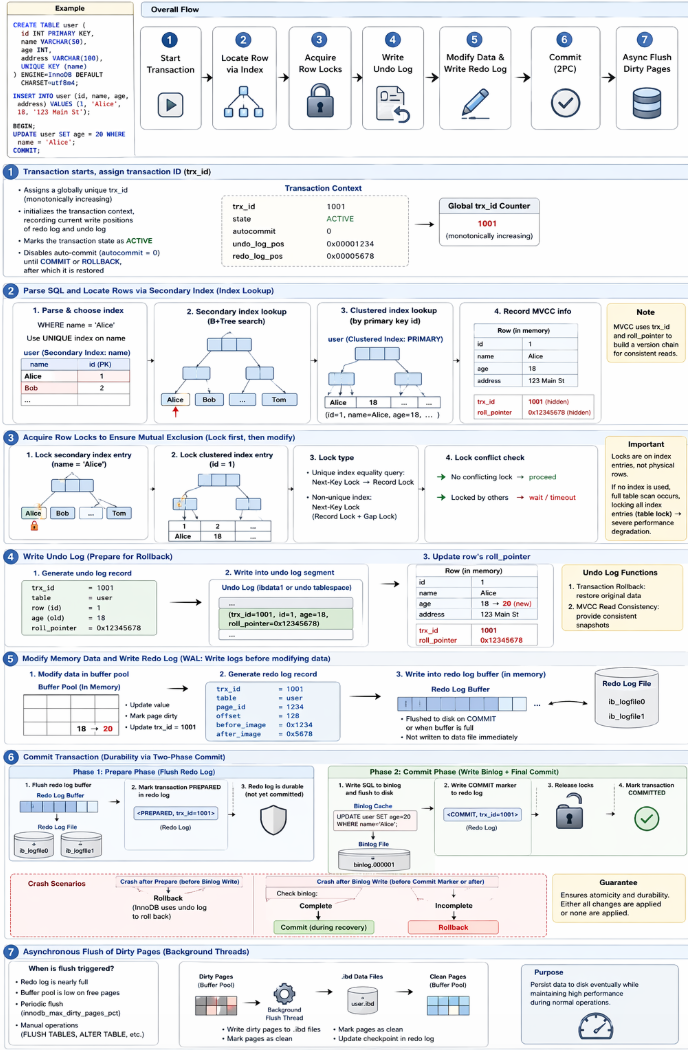
When a transaction is executed, the following sequence of events occurs:1
2
3
4
5
6
7
8
9
10
11
12
13CREATE TABLE user (
id INT PRIMARY KEY,
name VARCHAR(50),
age INT,
address VARCHAR(100),
UNIQUE KEY (name)
) ENGINE=InnoDB DEFAULT CHARSET=utf8mb4;
INSERT INTO user (id, name, age, address) VALUES (1, 'Alice', 18, '123 Main St');
BEGIN;
UPDATE user SET age = 20 WHERE name = 'Alice';
COMMIT;
- Transaction starts, assign transaction ID(trx_id):
- Assigns a globally unique transaction ID (trx_id) to the current transaction (monotonically increasing);
- Initializes the transaction context, recording the current write positions of redo log and undo log;
- Marks the transaction state as ACTIVE;
- Disables auto-commit (autocommit = 0) until COMMIT or ROLLBACK, after which it is restored.
- Parse SQL and Locate Rows via Secondary Index (Index Lookup)
When executing:UPDATE ... WHERE name = 'Alice';- Parse the WHERE condition and identify the index to use (in this case, the unique index on
name). - Secondary index lookup, traverse the B+ tree of the secondary index to find the leaf node containing the entry for
name = 'Alice'. - Clustered index lookup, using the primary key (id) obtained from the secondary index to locate the corresponding row in the clustered index.
- Record row version information for MVCC, including the transaction ID (trx_id) and the undo log pointer (roll_pointer) for the current transaction.
- Parse the WHERE condition and identify the index to use (in this case, the unique index on
- Acquire Row Locks to Ensure Mutual Exclusion (InnoDB follows a “lock first, then modify” strategy)
- Lock secondary index entry, add a record lock on the secondary index entry for
name = 'Alice'to prevent other transactions from modifying it concurrently. - Lock clustered index entry, add a record lock on the clustered index entry for the corresponding
- Important behavior:
- For unique index equality queries: Next-Key Lock is downgraded to Record Lock
- For non-unique indexes: Next-Key Lock (Record Lock + Gap Lock) is used to prevent phantom reads
- Lock conflict check
- If no other transaction holds the lock → proceed
- If already locked → current transaction waits (or times out)
Locks are applied on index entries, not physical rows. If the WHERE clause does not use an index, a full table scan occurs, locking all index entries (effectively a table lock), which can cause severe performance degradation.
- Lock secondary index entry, add a record lock on the secondary index entry for
- Write Undo Log (Prepare for Rollback)
Before modifying data, InnoDB records the original version into the undo log:- Generate undo log record (logical log storing reverse operation):
1
2
3
4
5trx_id = 1001,
table = user
row = id = 1
age = 18 (original value)
roll_pointer = 0x12345678 (pointer to undo log record) - Write into undo log segment, stored in
- Shared tablespace (ibdata1) or
- Separate undo tablespace (if configured)
- Update row’s rollback pointer, the row’s hidden roll_pointer now points to this undo record, forming a version chain for MVCC.
Core Functions of Undo Log:
- Transaction Rollback: If the transaction is rolled back, InnoDB uses the undo log to restore the original data.
- MVCC Read Consistency: When a transaction reads data, it checks the undo log to determine if the data has been modified by other active transactions, ensuring that it sees a consistent snapshot of the database.
- Generate undo log record (logical log storing reverse operation):
- Modify Memory Data and Write Redo Log (WAL Principle: Write logs before modifying data)
- Modify data in the buffer pool, the in-memory representation of the data file.
- Update the value;
- Mark the page as dirty (indicating it has been modified and needs to be flushed to disk).
- Update hidden column trx_id to the current transaction ID (1001) to indicate that this row is modified by the current transaction.
- Generate redo log record (physical log storing changes):
1
2
3
4
5
6trx_id = 1001,
table = user
page_id = 1234
offset = 128
before_image = 0x1234 (original data)
after_image = 0x5678 (modified data)- Written into redo log buffer in memory, which is flushed to disk when the transaction commits or when the buffer is full.
- Not immediately written to the data file, allowing for efficient batching of disk writes and improved performance.
- Modify data in the buffer pool, the in-memory representation of the data file.
- Commit Transaction (Durability via Two-Phase Commit)
On COMMIT, InnoDB ensures durability and consistency between redo log and binlog:- Phase 1: Prepare Phase (Flush Redo Log)
- Flush redo log buffer to disk (controlled by innodb_flush_log_at_trx_commit = 1) to ensure that all changes are safely stored in the redo log before committing.
- Mark transaction as PREPARED in redo log, indicating that it is ready to commit.
- At this point, redo log is durable, but transaction not yet fully committed (binlog not yet written).
- Phase 2: Commit Phase (Write Binlog + Final Commit)
- Write SQL to binlog and flush to disk (controlled by sync_binlog = 1) to ensure that the transaction is recorded for replication and recovery.
- Write COMMIT marker into redo log to indicate that the transaction is fully committed.
- Release all locks held by the transaction, allowing other transactions to proceed.
- Mark transaction as COMMITTED, making all changes visible to other transactions.
If the server crashes after Phase 1 but before Phase 2, InnoDB can use the redo log to recover the database to a consistent state, ensuring that either all changes are applied or none of them are applied, maintaining the integrity of the database. If the server crashes after Phase 2, the transaction is already fully committed and will be recovered as such during crash recovery.
Crash scenarios: - Crash after prepare → rollback
- Crash after binlog write → check binlog:
- complete → commit
- incomplete → rollback
- Phase 1: Prepare Phase (Flush Redo Log)
- Asynchronous Flush of Dirty Pages (Background Threads)
After commit, dirty pages are not immediately flushed to disk. Flush is triggered when:- Redo log is nearly full
- Buffer pool is running low on free pages
- Periodic flush (controlled by innodb_max_dirty_pages_pct)
- Manual operations (FLUSH TABLES, ALTER TABLE, etc.)
Flush process:
- Background thread writes dirty pages to .ibd files
- Marks pages as clean after flushing
- Updates checkpoint in redo log